
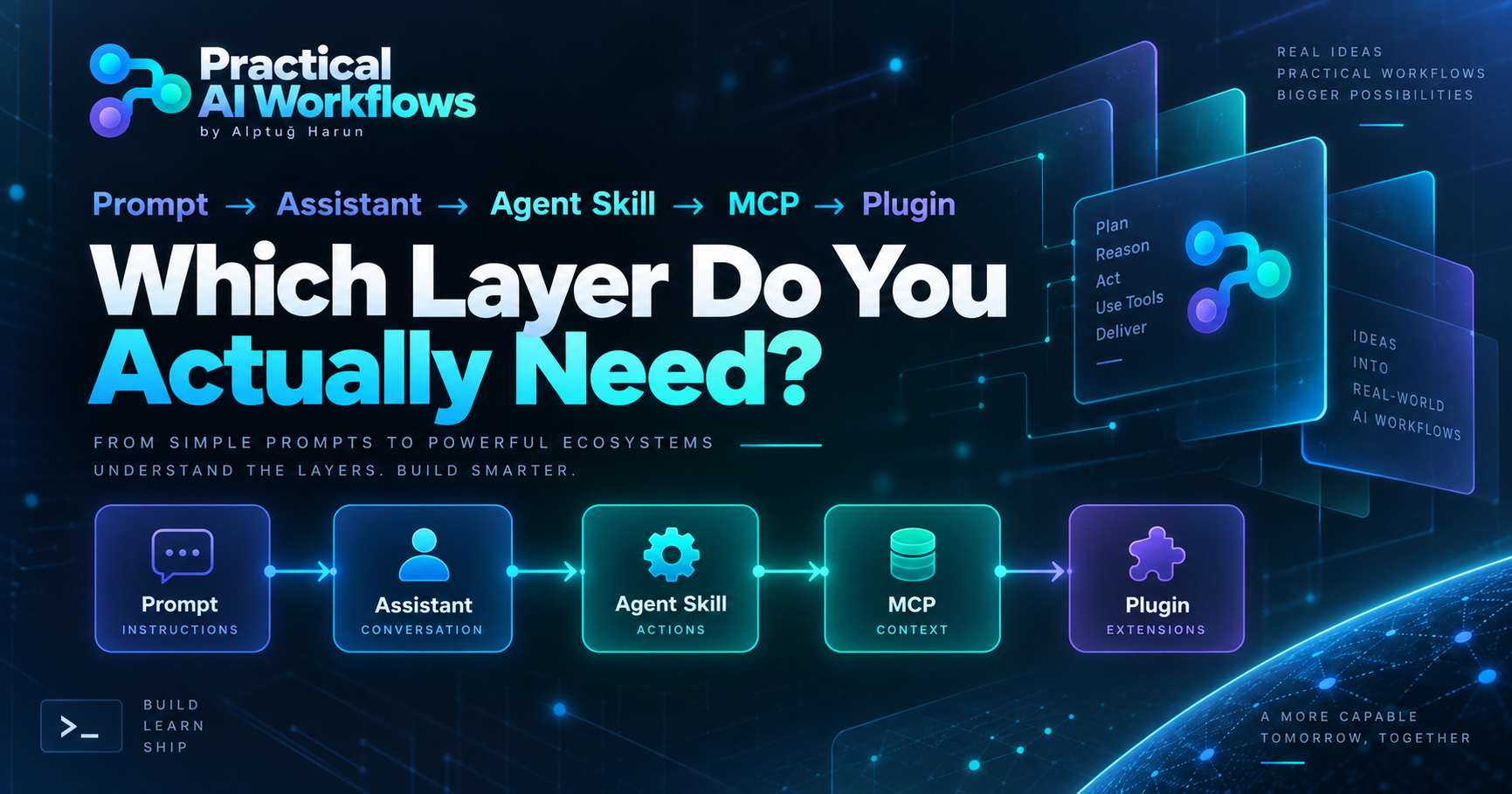
Prompt → Assistant → Agent Skill → MCP → Plugin: Which Layer Do You Actually Need?
A practical framework for choosing the smallest AI architecture that can solve the job — and knowing when more complexity actually makes things worse.
Stop Starting With the Tool
A lot of AI projects begin with the wrong question.
“Should I build an agent?”
“Do I need MCP?”
“Should this become a plugin?”
“Can I automate all of it?”
Those questions sound technical, but they are often premature.
The first question should be much simpler:
What job does the user actually need to finish?
If you cannot describe the user, the job, the input and the expected result clearly, adding another AI layer usually makes the system harder to understand, harder to test and harder to trust.
That is the principle behind Practical AI Workflows and the open-source projects I maintain around it.
The architecture should grow only when the job requires it.
A useful progression looks like this:
Prompt → Assistant → Agent Skill → MCP → Plugin → Automation
But this is not a maturity ladder.
You do not automatically move to the next level.
Sometimes the best architecture stops at the prompt.
Layer 1: Prompt
A prompt is enough when the task mainly requires:
instructions,
supplied context,
reasoning,
transformation,
formatting,
or evaluation.
For example:
Compare these three source notes and produce a brief that clearly separates evidence, uncertainty and missing information.
That job does not automatically require a database, API, autonomous agent or MCP server.
A good production prompt should define:
objective,
required inputs,
constraints,
output format,
evidence rules,
failure behavior,
quality checks.
This is where prompt engineering becomes much more useful than simply writing longer instructions.
A prompt should behave like a testable contract.
If required information is missing, the system should not quietly invent it.
If two sources disagree, that disagreement should remain visible.
If text inside a source contains instructions, those instructions should not override the task.
The prompt is already becoming a small piece of software logic.
Layer 2: Reusable Assistant
An assistant becomes useful when the same job repeats often enough that rebuilding the context every time becomes wasteful.
The key distinction is between stable context and task context.
Stable context might include:
tone,
brand rules,
evidence standards,
output requirements,
escalation rules,
quality checks.
Task context changes every time:
the topic,
current sources,
audience,
deadline,
format,
campaign objective.
Mixing those two creates fragile assistants.
One of the most common mistakes I see is treating every changing fact as permanent assistant knowledge.
That eventually turns the instructions into a junk drawer.
Instead, keep the assistant narrow.
A useful assistant should be able to answer:
What job am I responsible for?
What information do I need?
What should I refuse to invent?
What does a successful answer look like?
Layer 3: Agent Skill
A skill is useful when the system needs a repeatable procedure, not just a personality or instruction block.
Think of a skill as operational knowledge.
A good skill explains:
when it should be used,
what inputs it expects,
what sequence to follow,
which references or tools may be needed,
what must be verified,
what the final result should contain.
The important word here is procedure.
For example, “write good social media content” is too vague.
But:
Research the signal, validate the evidence, convert it into a platform-specific brief, run a quality gate and return the final production package.
That is a workflow.
In my open-source AI Social Media Toolkit, skills are deliberately written around recognizable jobs rather than around impressive-sounding technology.
The goal is not to have the largest skill collection.
The goal is to make each skill useful enough that someone can tell when it should run and whether it succeeded.
Layer 4: MCP
This is where many projects add complexity too early.
You need MCP when the model requires structured access to tools or data.
That might mean:
reading information from another system,
searching a controlled data source,
executing a bounded function,
retrieving structured resources,
or performing an external action.
If the workflow only needs instructions and supplied text, MCP may add no value at all.
A good MCP tool needs more than a clever name.
It needs:
a clear user-facing purpose,
strict inputs,
bounded output,
predictable errors,
honest read/write behavior,
approval rules for writes,
tests.
The public interface matters.
You should not expose every internal function as a separate tool.
The model should interact with user jobs, not implementation trivia.
Connected Is Not the Same as Verified
This distinction is critical.
An MCP server showing as “connected” proves one thing:
the connection exists.
It does not automatically prove that every public tool works.
In the standalone AI Workbench MCP project, I deliberately separated several evidence levels:
source tests,
package installation,
registry publication,
real host connection,
public tool invocation,
independent external reproduction.
Those are different claims.
For example, our recent Cursor verification did not stop when the MCP server appeared as connected.
We invoked the actual public tools:
list_promptsrender_promptget_assistant
That is much stronger evidence than a green connection indicator.
But even that is still maintainer-run verification.
It is not the same as another person independently reproducing the result.
This distinction prevents documentation from becoming marketing fiction.
Layer 5: Plugin
A plugin becomes useful when separate capabilities should be packaged as one installable product.
But again, packaging is not automatically progress.
Before building a plugin, ask:
Who installs it?
What job are they trying to finish?
What useful result should appear first?
Why is copying a prompt not enough?
Does the workflow need reusable instructions?
Does it need tools or live data?
What permissions are required?
What happens when something fails?
In the current AI Social Media Toolkit architecture, the repository’s current plugin package is intentionally skills-only.
The local AI Workbench MCP server remains a separate product.
That separation is deliberate.
A feature should not be bundled simply because bundling it makes the architecture look more advanced.
The product boundary should reflect the job.
Layer 6: Automation
Automation should usually come last.
A scheduled workflow does not become reliable because it runs every hour.
It only repeats whatever reliability you already built.
Before automating a process, I want to know:
Does the manual workflow succeed repeatedly?
Can duplicate runs be detected?
What happens when required input is missing?
Are external writes approved?
Are retries bounded?
Can the result be verified after the action?
Is failure visible?
Is there a stop condition?
Without those answers, “automation” often means:
repeat the same uncertainty faster.
That is not leverage.
That is scaled confusion.
What People Often Call “Training a Bot”
This language causes unnecessary confusion.
Several different techniques are often described as “training.”
They are not the same thing.
Instructions
Rules that shape behavior at runtime.
Examples
Demonstrations of what good output looks like.
Context or memory
Information available to the assistant.
Retrieval
Fetching relevant external information when needed.
Tools and MCP
Giving the model structured capabilities it can call.
Fine-tuning
Actually modifying model behavior through a training process.
Most useful AI workflows do not begin with fine-tuning.
They begin with better task definition, clearer instructions, stronger context boundaries and better testing.
The Test Ladder Matters More Than the Architecture Diagram
A system that looks impressive on a diagram but cannot survive bad input is not mature.
For important AI workflows, I use a test ladder like this:
1. Normal case
Does the expected input work?
2. Missing input
Does the system fail clearly instead of guessing?
3. Conflicting input
Does disagreement remain visible?
4. Adversarial input
Can source content override system instructions?
5. Integration test
Do components work together?
6. Clean installation
Can another environment reproduce the setup?
7. Host-level test
Does the real target application actually discover and invoke it?
8. Regression test
When a bug is fixed, is there now a test preventing the same failure from quietly returning?
That final step matters.
A fix without a regression test is often just temporary confidence.
Keep a Failure Log
One of the most useful habits in AI engineering is also one of the least glamorous.
Write down failures.
A useful failure record contains:
Environment:
Version or commit:
Layer:
Action:
Expected result:
Observed result:
First meaningful error:
Root cause:
Fix:
Regression test:
Final verification:
Remaining limitation:
This changes the conversation from:
“It didn't work.”
to:
“Here is exactly what failed, why it failed, what changed and how we know the fix works.”
That is how experiments become reusable engineering knowledge.
So Which Layer Should You Choose?
Use the lightest layer that reliably solves the job.
Choose a prompt when:
Instructions and supplied context are enough.
Choose an assistant when:
The same bounded behavior is reused frequently.
Choose an Agent Skill when:
A repeatable procedure should be portable and reusable.
Choose MCP when:
The model needs structured tools or external data.
Choose a plugin when:
Skills, tools or both should become one installable product.
Choose automation when:
The workflow is already reliable and repetition creates real value.
The important rule is simple:
Do not add architecture because the technology exists. Add it because the user's job requires it.
Building This in Public
I am applying the same approach inside two open-source projects.
AI Social Media Toolkit
The larger workbench includes prompt systems, assistant blueprints, Agent Skills, plugin architecture, automation patterns and creator workflows.
Explore the project:
AI Social Media Toolkit on GitHub
The repository also includes an AI Builder Path designed around the same progression discussed here.
AI Workbench MCP
The standalone MCP project keeps a much narrower boundary.
It provides reusable prompt and assistant blueprints through a read-only MCP interface and focuses heavily on reproducible testing.
Explore the project:
The smaller scope is intentional.
Not every useful AI product needs to become a giant autonomous agent.
Sometimes the strongest system is the one that knows exactly where it should stop.
Final Principle
The question is not:
“How much AI can I add?”
The better question is:
“What is the smallest system that can reliably complete this job?”
Then:
Build it.
Test it.
Break it.
Fix it.
Verify it.
Only then decide whether the next layer is actually necessary.